
Most website owners are surprised by what their own site loads. Themes, plugins, and past marketing experiments leave scripts behind, and some of them collect visitor data on your behalf. Bloomlight detects what's actually running so you can decide what stays.
See what we detected
Each audit fingerprints the technologies on your pages and groups them by what they do: platforms and CMS, frameworks and libraries, tag managers, analytics, advertising pixels, session recorders and heatmaps, customer-data platforms, and marketing tools. The first three groups build your site; the rest are the ones collecting data.
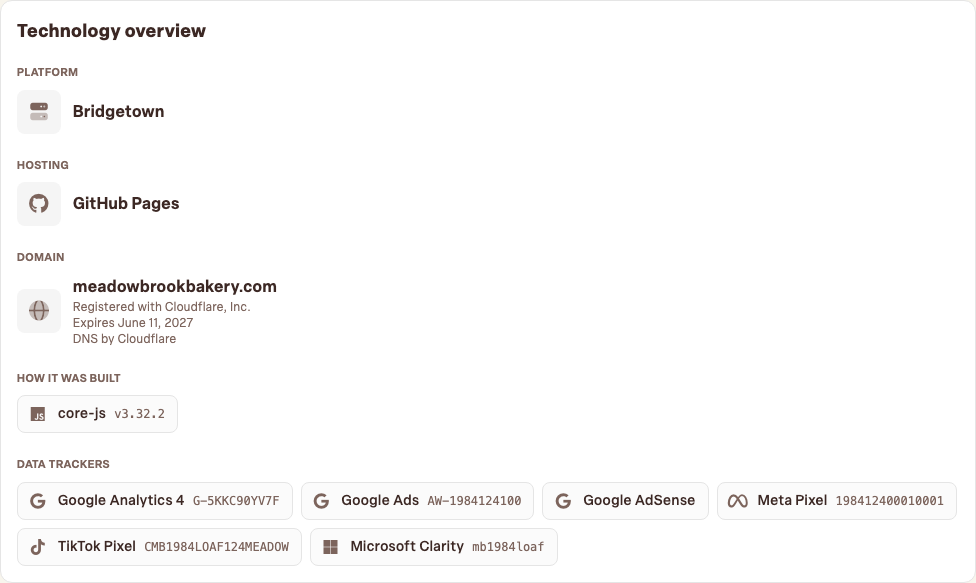
What the ID numbers mean
Trackers show up with identifiers like G-XXXXXXX (Google Analytics), GTM-XXXXXX
(Google Tag Manager), or a numeric pixel ID (Meta). The ID names the account receiving the data. That's
worth checking: an ID belonging to a former agency or an old freelancer means someone outside your business is
still collecting your visitor data. If you don't recognize an ID, ask whoever manages that tool to confirm it's
yours.
Deciding what stays
For each tracker, ask two questions: do we use the data? and do we mention it in our privacy policy? A tool nobody's logged into since 2024 is pure liability. It slows the page and widens your privacy exposure for zero benefit, so removing it is a performance fix and a privacy fix in one.
Watch for newcomers
Detection runs with your regular audits, so if a plugin update quietly adds a new tracker, it appears in the list with a first-seen date. A quick skim after installing anything new keeps your data story honest.